 Get Hooked!
One engine, seventy-one features
The whole list is below, one line each, for anglers who want to count before spending $29.99. But counting misses the point — so first, thirty seconds on how it's wired.
The difference
Every other app stacks layers.
This one feeds engines.
Every fishing app's feature list has the same nouns — map, weather, log, solunar. The difference is where they point. In other apps a feature ends at a screen: radar draws radar, charts draw depth, the log holds your fish and keeps them. Here, almost everything is an input, and the inputs converge on engines tuned by the one thing nobody else has — your log. A layer is worth the same to every user forever. An engine gets more valuable every trip.
What the engines answer is the six questions every angler works through between the driveway and the first fish: whether to go, where, when, what to tie on, why it works, and how exactly to run it. The list below is grouped by the question each feature feeds.
Whether — is today worth the fuel
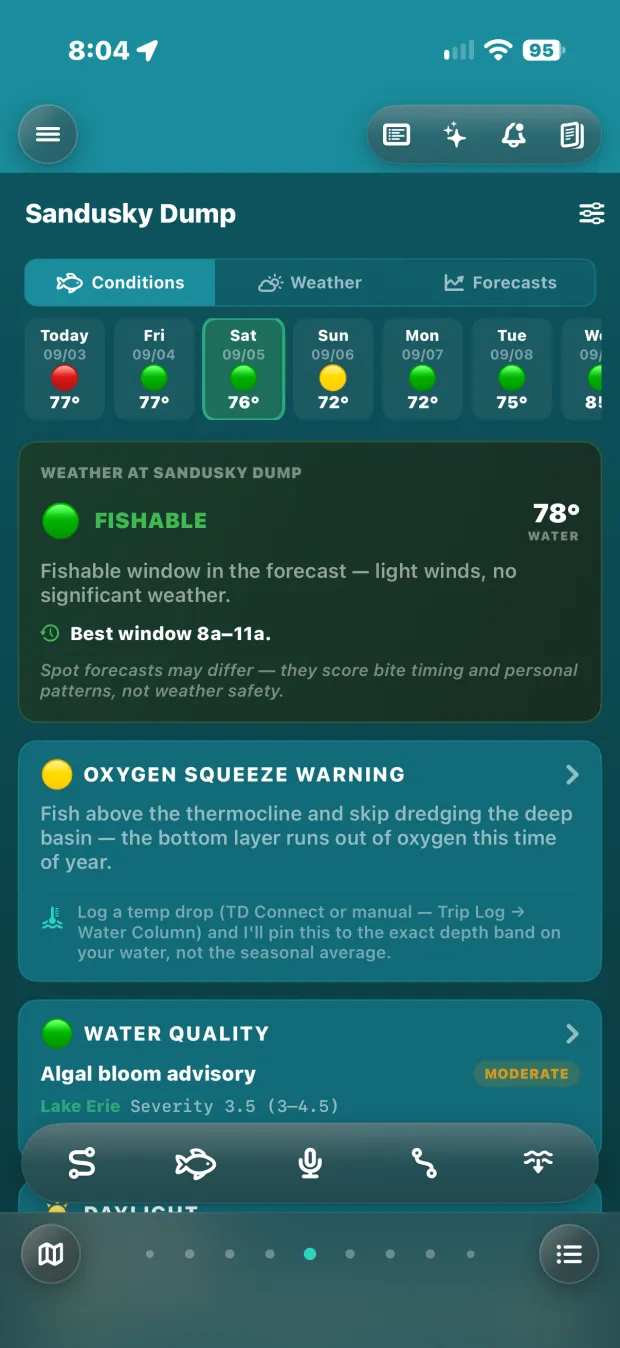
The first call of the day, and the one most apps answer worst — a daily average is a lie about a lake. This one grades the day against your boat, not a generic hull, and refuses to smooth away the only window you had.
The verdict
One card answers whether today is worth the fuel — graded against your boat, not a generic hull.
Fishing windows
Go at six, be off by noon — not a daily average that swallows a good morning under an afternoon front.
Honest waves
Minimum and maximum per window, gaps left visible — never a smoothed number that's wrong twice a week.
Face tiles Apple Watch
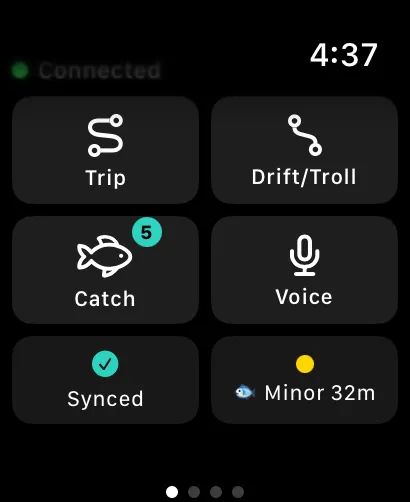
Six watch complications, including the day's tally riding inside the fish — the answer on your wrist before the coffee's poured.
Where — from your seasons, not a crowd's
Everyone else answers where with a crowd — the same hot spots handed to every stranger at the ramp. These answer it from your own history: not where fish are, where you do well. And because the layers stack — contours under your catches under the heat map, filtered by season and year — the map can do something no other app can: draw your fish moving. April against June against October, your own log sliding from the spawning flats to the summer breaks to the fall feed. And once the log has a season in it, the map goes further still — it plays your history back, animated across the calendar, so you watch where you caught fish and when. Everyone knows fish migrate; this shows you where yours go, in motion.
Ranked areas
Every area you keep, scored seven days out against your own catch history — in order, on one map.
Plan my trip
One tap turns the ranked week into a plan: the window worth the fuel, the leg with the most behind it, a fallback if it cools, and one run through water you've never fished — with what it left out, and why. If nothing on your water scores, it says hold off.
Catch heat map
Weighted by catches per hour, not visits — the reef you hit once and limited out on burns brighter than the home water you idle past weekly.
River Explorer
Tap a gage and trace every tributary upstream — 24.5 million mapped stream segments, drawn offline, so the creek nobody measures is read from the river that measures it.
Déjà vu alerts
"Tomorrow looks 92% like June 16 — when you caught eight." It watches so you don't have to.
Layers that stack
Contours, your catches and the heat map on one map at once — depth under fish under rate, instead of three screens you flip between.
Watch your fish migrate
Filter the stack by season and year and your log draws the movement — where they were in April, where they'd gone by July, from your data, over your structure. Why it matters: you stop fishing memories and start fishing the calendar.
Play your seasons back
Once your log has earned it — a season, a few hundred catches — the map animates your history over time: a year, a season, all of it. Nobody else can build this, because nobody else has your log.
Real playback, not a mockup: April into May on one angler's own log — 51 catches across 4 spots becoming 113 across 10 as the season turns. The map in full → · Rivers in full →
When — your hours, not the almanac's
Solunar tables are identical for every angler at your longitude. These aren't: the hours are weighted by when you actually catch fish, which the almanac has no way to know.
Hourly bite windows
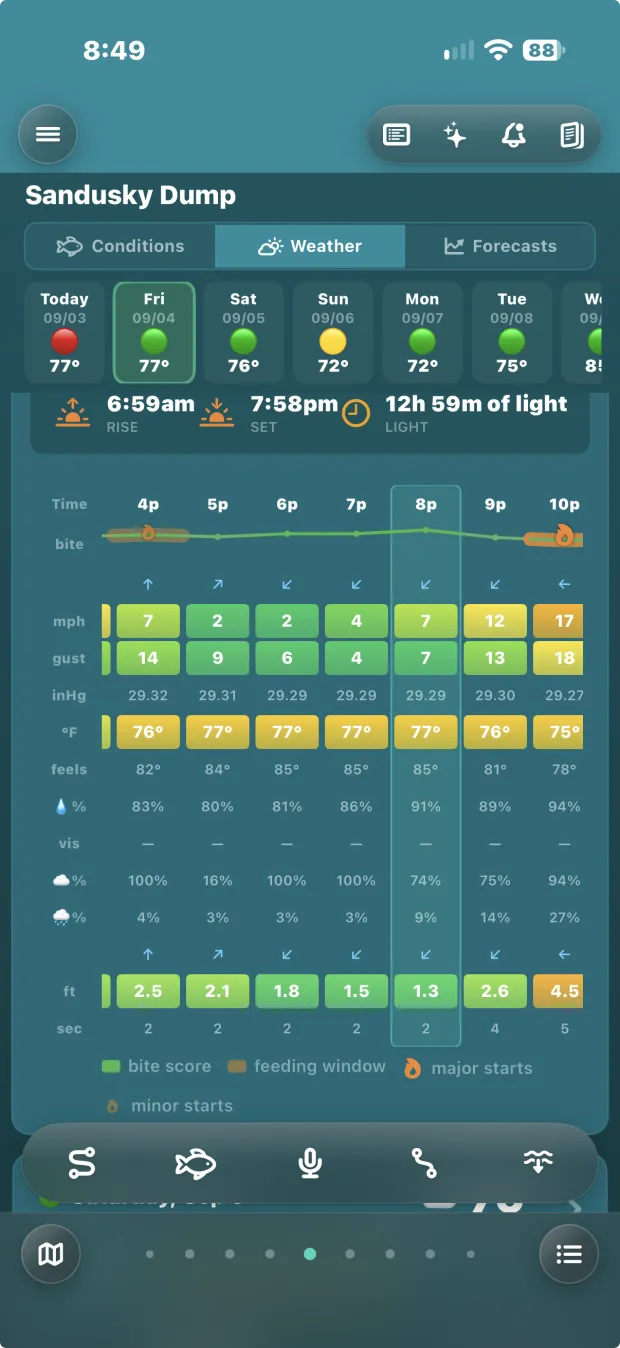
Each day breaks into an hourly curve: solunar, weather, and the times you actually catch fish.
Solunar & light
Major and minor periods, sunrise to last light, golden hours — computed on the phone, signal or not.
Bite notifications
The major window notifies you once — on the wrist if you wear one — and cancels itself when the trip ends.
The bite line runs over the hours it was scored from — wind, gusts, pressure, waves — with the feeding windows banded and the major starts flagged, and a key underneath saying what each mark is. Every mark on it is defined on the screen it appears on.
What — to target, and to tie on
A crowd app can tell you what strangers caught on your lake. It cannot tell you what has worked from your hand, on this water, in this month — or check any of it against today's light.
Arrival intelligence
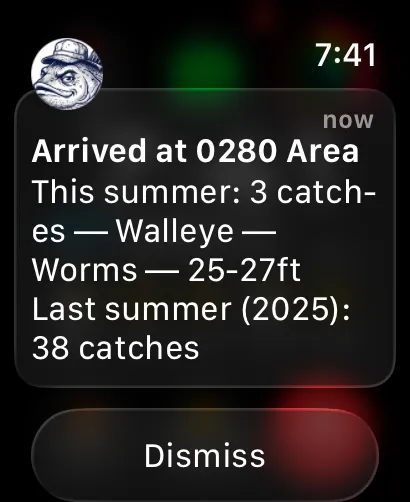
Pull up to a spot and the app tells you what's worked here: species, bait, depth, this summer and last.
Walleye colours
Today's light and water against what colours actually run — go-to, fading, and skip.
Species tactics
Seventeen species, each read against today's water temperature and the season — where it should be holding and how to fish for it.
What they're eating
For walleye: the prey on this water this month and how hard they're feeding, set beside what your go-to bait imitates.
Why — the rung nobody else can reach
Answering why needs the half of the log nobody else keeps: what didn't work. A record of only successes can't tell "wrong bait here" from "never tried here" — so a crowd's data structurally cannot answer this question. Yours can, because this app records the misses.
Patterns
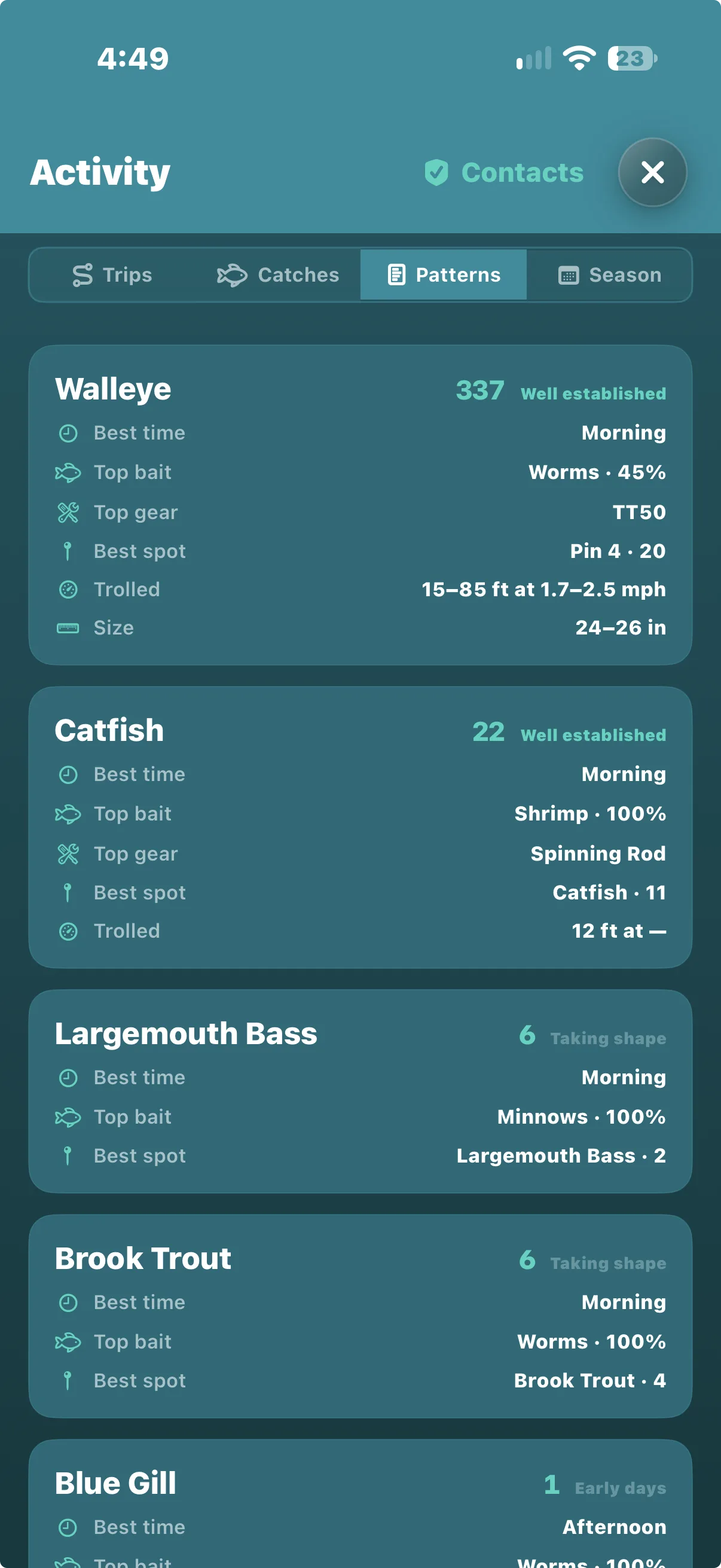
Best hours, top bait, where they came from — per species, over everything you've logged.
Anti-patterns
What has never once worked. Nobody else even records it, and it sharpens every score.
Weights you control
Eleven metrics behind every score, ten of them yours to move. Think pressure beats wind on your water? Move the slider and it re-runs.
It grades itself
Forecasts check their own homework against what you caught, and the scoring adjusts.
Season report
The whole year totalled: species, baits, best months, and what changed since last season — the why, written up annually.
Next year's playbook
Each season boiled down to what to do next time: the top three baits, gear, colour combinations and finishes, each bait's record against the times it was tried and refused, the spots that produced — and the changes most likely to buy the next ten percent.
Every species says how much it is willing to claim — well established at 337 catches, early days at one. A pattern that admits its own thinness is one you can act on. The log, read back →
How — the exact presentation
Not "use a worm harness." Worm harness, 2.2 mph, 85 feet of line, 27 to 42 down — recoverable because the app was watching the boat when it worked. Nobody else models your hull in this wind; they model the water and stop.
Drift & troll tracking
Speed, line and catches per drift or troll — with the predicted line drawn against what the boat actually did, so the gap teaches you your own hull.
Dive charts
A curve for every common bait and lure: your rig and your speed become a depth, so "twenty feet down" stops being a guess.
Troll speed watch
An alert when you drift off your target speed — with the screen off, and on the wrist if you wear one.
Water column
Where fish can actually breathe today, and how far down that is.
Drop pin & measure
Mark water without logging a fish there, or tap out a run — distance, bearing, and whether it fits the tank.
Quick reference
Channels, services and the numbers you need in a hurry — one screen, readable with a rod in one hand.
The bottom — depth data that is actually ours
Everyone else licenses charts to draw them. This depth data is built from public sources and belongs to the app — which means it can feed the engines, not just sit on the screen. Twelve downloadable packs ship today, inland and coastal, and the map never claims water it doesn't have.
The bottom, on the map
Depth contours in feet across Lake Erie, Huron, Michigan and Ontario — plus inland lakes across Ohio, Michigan, Minnesota, Indiana and Illinois: Indian, Pymatuning, Mille Lacs, Alum Creek, Salt Fork, Buckeye and more.
Coastal water, on its own terms
Six coastal regions from the Atlantic Northeast to the Pacific Northwest — Gulf both sides — cut from NOAA's coastal relief survey and field-tested on salt.
Structure worth running to
Named reefs and shoals, tappable with depth ranges — plus 506 placed fish attractors, standing timber, stumps, lily pads, drowned stream channels, and hard-versus-soft bottom.
Chart paper
One tap flips the map to a paper-chart look — black contours on white water — legible in full sun, over any basemap.
Offline packs
A whole state or coastal region's bottom data, a few MB, downloaded once and working with no signal. Sizes shown before you download.
The map comes with you
Tell the app where you're going and it downloads the map itself for that water — so offline isn't just your data, it's the ground under it.
Smart pills
Filters appear only where their data exists — the map answers for the water you're actually looking at.
Bottom depth on a catch
Log the water depth alongside the lure depth — and an estimate never overwrites what you typed.
Where a state has published nothing usable, the app lists it as unavailable and says why — never a blank map pretending. Depth data: state natural-resources agencies (Ohio DNR and counterparts) · NOAA NCEI, including the Coastal Relief Model.
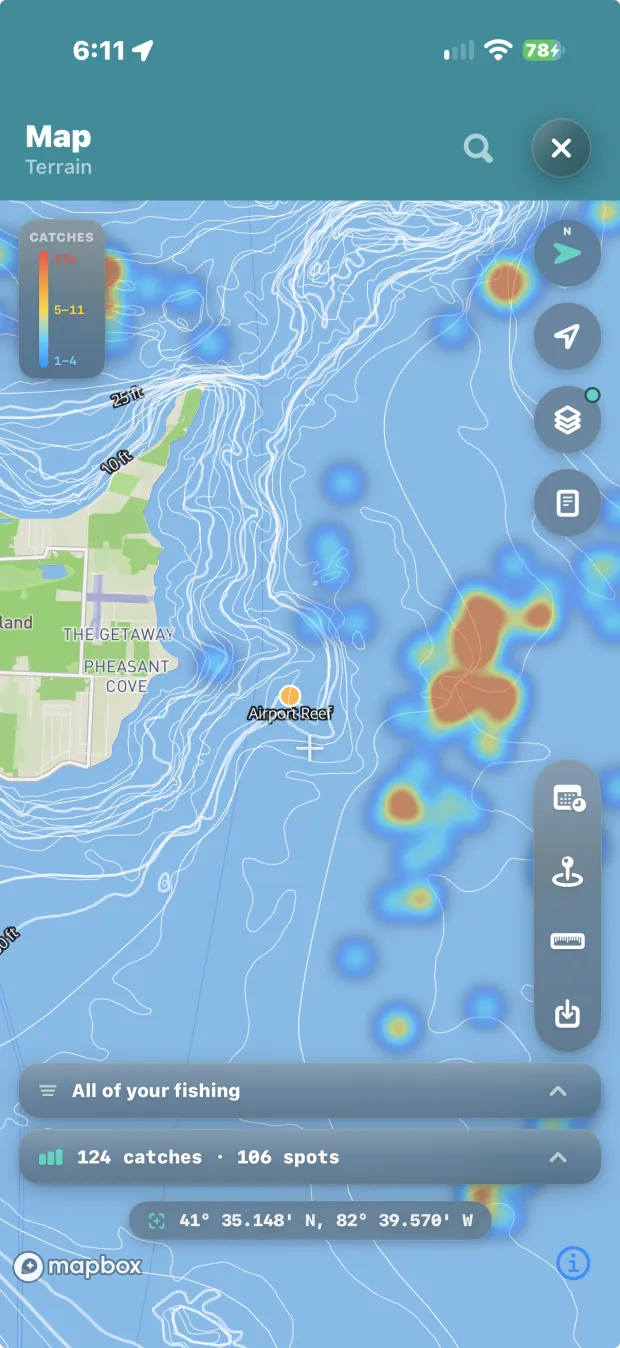
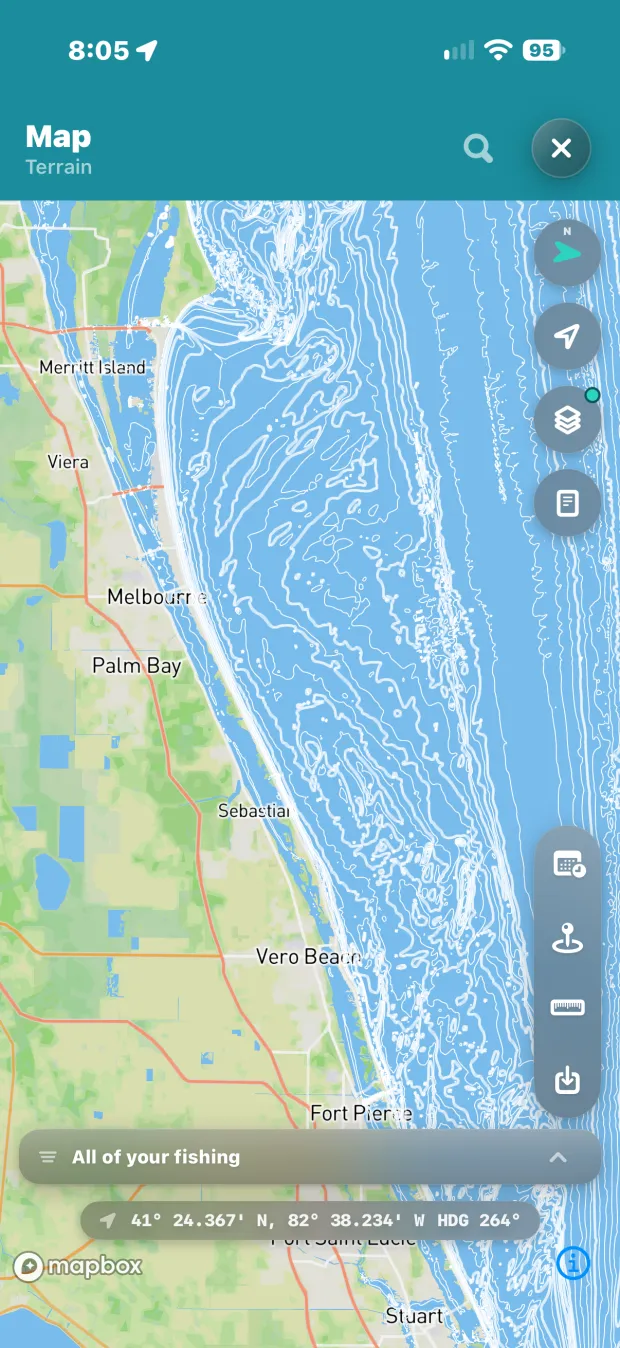
Inland and coastal, the same data either way — Great Lakes contours past a named reef with the heat map over them, and the Atlantic coast off Florida contoured from Merritt Island to Stuart. The bottom is not a backdrop here; it is one of the layers your fishing gets read against.
Feeding it — capture priced at one tap
Engines are only as good as the corpus behind them, so getting a fish into the log costs one tap, one sentence, or nothing at all — and day one imports the years of history you already own.
One-tap logging
The Catch button logs where you are, now. Details are optional and can wait for the dock.
Voice capture
Say it — "walleye, 27 feet, worm harness" — and it's logged, parsed, and placed.
Watch capture Apple Watch
Log catches with the phone in the dry bag — it queues offline and drains when you're back in range.
Wrist-down tracking Apple Watch
The odometer keeps counting and the speed alert still fires with your arm at your side.
Siri iPhone
"Log a walleye, 85 feet down." Start trips, hear conditions, confirm a dive chart — hands never leave the rod.
Auto trips
Leave the dock and the trip starts itself; return and it ends. The day groups without you pressing anything.
Log it later
Forgot to tap? Set the time, drop the spot on the map, and the catch joins the trip it belongs to.
Water temperature on every catch
Each catch keeps the water temperature at the time and the station it came from, so the log can say "the week the water turned," not just "late September."
Photo import
Years of fish photos become trips, spots and catches in minutes — found and organised for you.
GPX import
Standard GPX from any plotter or fish finder — your marks and tracks come across whole.
v3 restore
Coming from the original Get Hooked!? Your backup imports intact, and the original is never touched.
The readings — done right, then fed forward
The part any app can do, done carefully. The difference is that nothing here stops at the screen: every reading is also an input to the engines above. And anything the app learns to read next — charts, imagery, whatever comes — lands the same way: as an input, never as one more layer.
Weather, hour by hour
Wind, gusts, rain, pressure and cloud for the week ahead, for every place you keep — on the phone before you lose signal.
Radar & sky
Live radar, cloud imagery, pressure trend, wind — the sky as it is, not as it was an hour ago.
Buoys, tides & flow
Live readings for your water, kept on the phone so they answer offline.
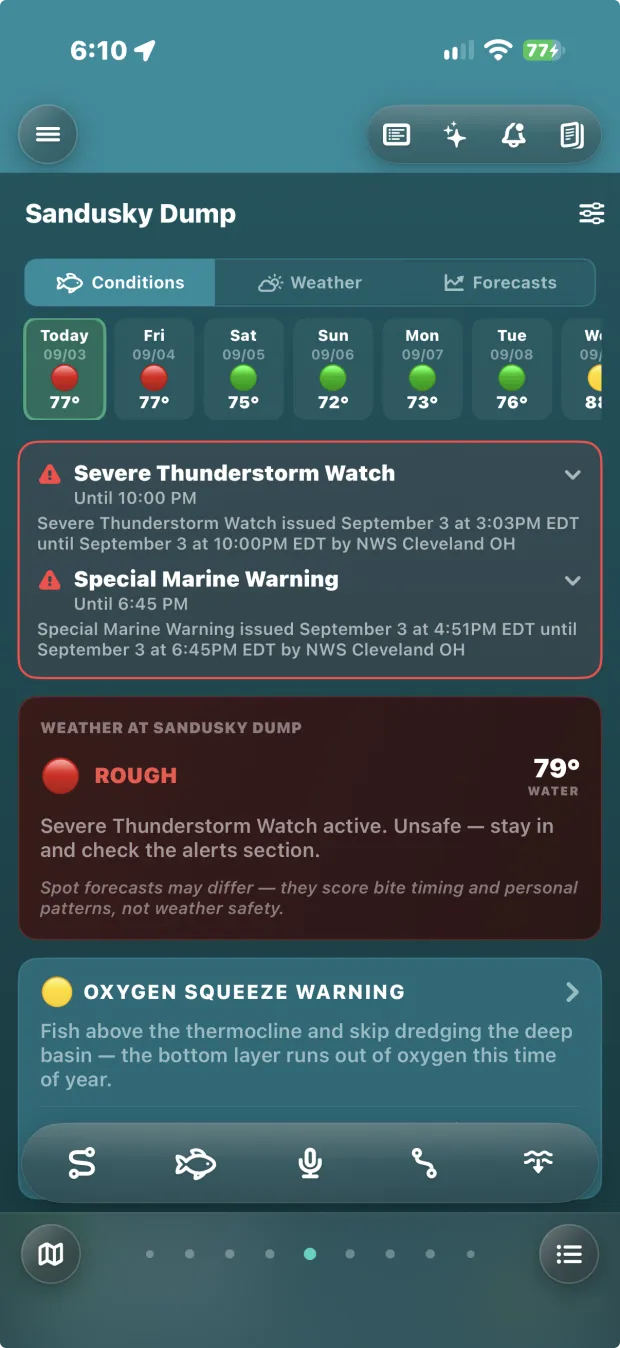
Weather alerts
Unsafe water and dangerous conditions near your areas, pushed before you're in them.
The day it says don't go is the day it earns the subscription. Today's conditions, live →
Yours — the record, and every exit
If the value lives in your log, the log has to be untouchable — working with no signal, kept in a second place without you asking, and free to leave whenever you want it to.
Trips, rebuilt
Every outing reconstructed on its own — catches, drifts, the weather at the time, the photos.
Fully offline
Logging, tides, forecasts you loaded, your whole history — working three hours from a tower.
iCloud backup iPhone
Automatic, to your iCloud — with the previous copy kept, so one bad backup can't eat a good one.
Sync
Sign in and your fishing follows you to the iPad or a second phone. Don't, and everything still works on the phone — and on Android, sync is your copy.
CSV export
Your whole log, out, whenever you want it.
Your log as a website
Export a browsable site of your entire history — no app, no account, no us required to read it.
Batch edit
Tidy twenty spots at once, and place catches that never got a fix one by one, with the trip's other catches on the map for context.
Deleted trips come back
A deleted trip waits in My Data and restores whole — its catches, drifts and tracks with it.
Launch countdown
Put the boat away for the winter and the app counts down to launch day — weekly at first, every day in the last week.
Support, inside the app
Common questions, the help, the videos and your subscription in one place — and a way to reach a real person.
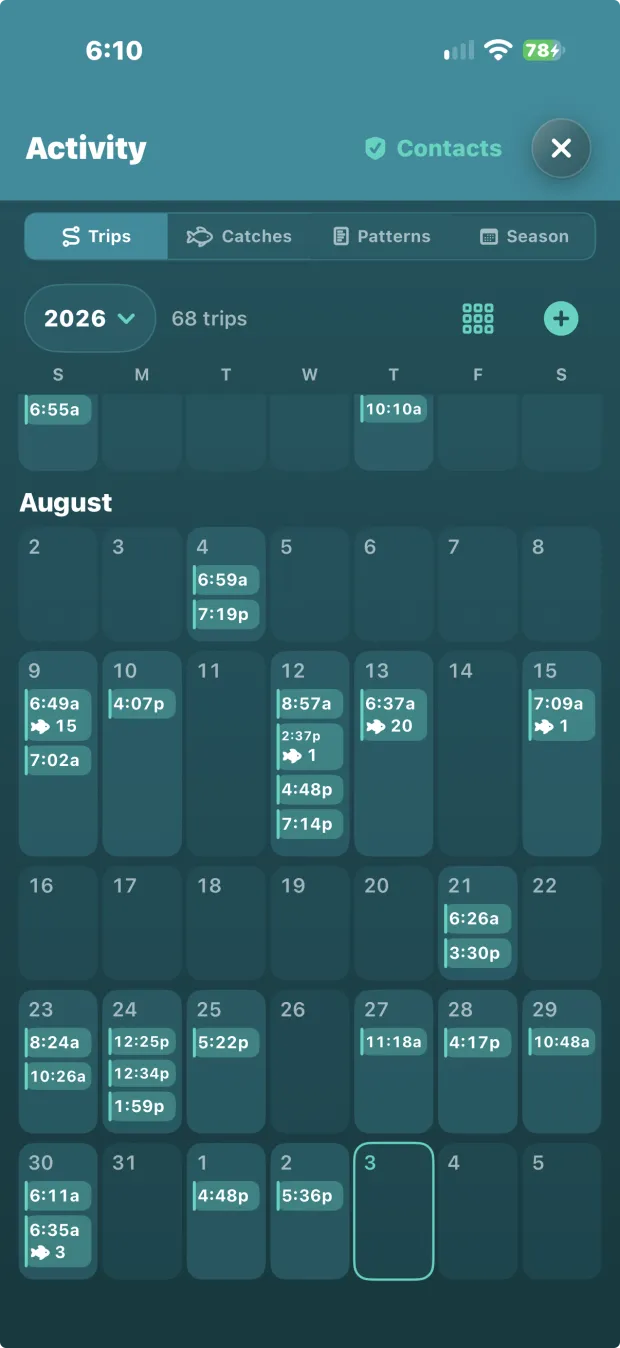
Sixty-eight trips in one season — this is the record the engines run on, and it is yours to take.
Sharing & safety — on your terms
No feed, no community, no leaderboard. Sharing is deliberate, one thing at a time — and the safety half runs even when you're a shore angler with no dock for anyone to watch.
Tell your contacts
Departure and return emails to people you choose, sent on their own — even when there's no dock to watch.
Queued, never lost
No signal at the ramp? The notice queues, retries, and tells you if it's stuck — it doesn't silently fail.
Buddy Share
Your live drift on a buddy's map. Invite-only, trip-time only, over when the trip is.
Share cards
A day worth bragging about becomes a card with the caption written for you. Your spots stay off it.
Captain's Mode — included
Licences & certs
Credentials with expiry warnings before one lapses — and sea time counts itself from your trips.
Trip postcards
A customer's day, drafted automatically: their fish, their photos, your booking link.
The registry
A public captain card with your water, your boat and how to book — at no extra cost, because there are no tiers.
And
There's one more thing in the app that isn't on this list. Finding it is the game.